A “Submit an event” form
Organizer name and email, event name, start and end in the organizer's time zone, a venue with its address or an online event, a link, a description and an image. Fonts and colors follow your site.
 Event Submissions & Approval Get the app
Community calendars · Venues · Clubs · Supported in Aria
Visitors submit events from a form on your site: date and time, venue or online, a description and an image. AI checks each one for spam, unsafe content, topic and missing details. You publish the good ones to your Wix Events calendar in one click.
Try the live demo View on App Market7-day free trial, then $5.99/month or $4.79/month billed yearly. Works with Wix Events.
Live demo
The form below runs the same code site owners install, with the same checks. Your event stays in this browser tab: nothing is saved or sent, reload to start over.
The page around the form and the “your dashboard” panel are an illustration; the form and its checks are the real app, including dates in your own time zone. Bot protection is real too: an event sent less than 3 seconds after the form opens, or with the hidden bot field filled in, is quietly dropped. The AI review and publishing to Wix Events run on your live site only, so they are not part of this demo; see them in the screenshots below.
What you get
Organizer name and email, event name, start and end in the organizer's time zone, a venue with its address or an online event, a link, a description and an image. Fonts and colors follow your site.
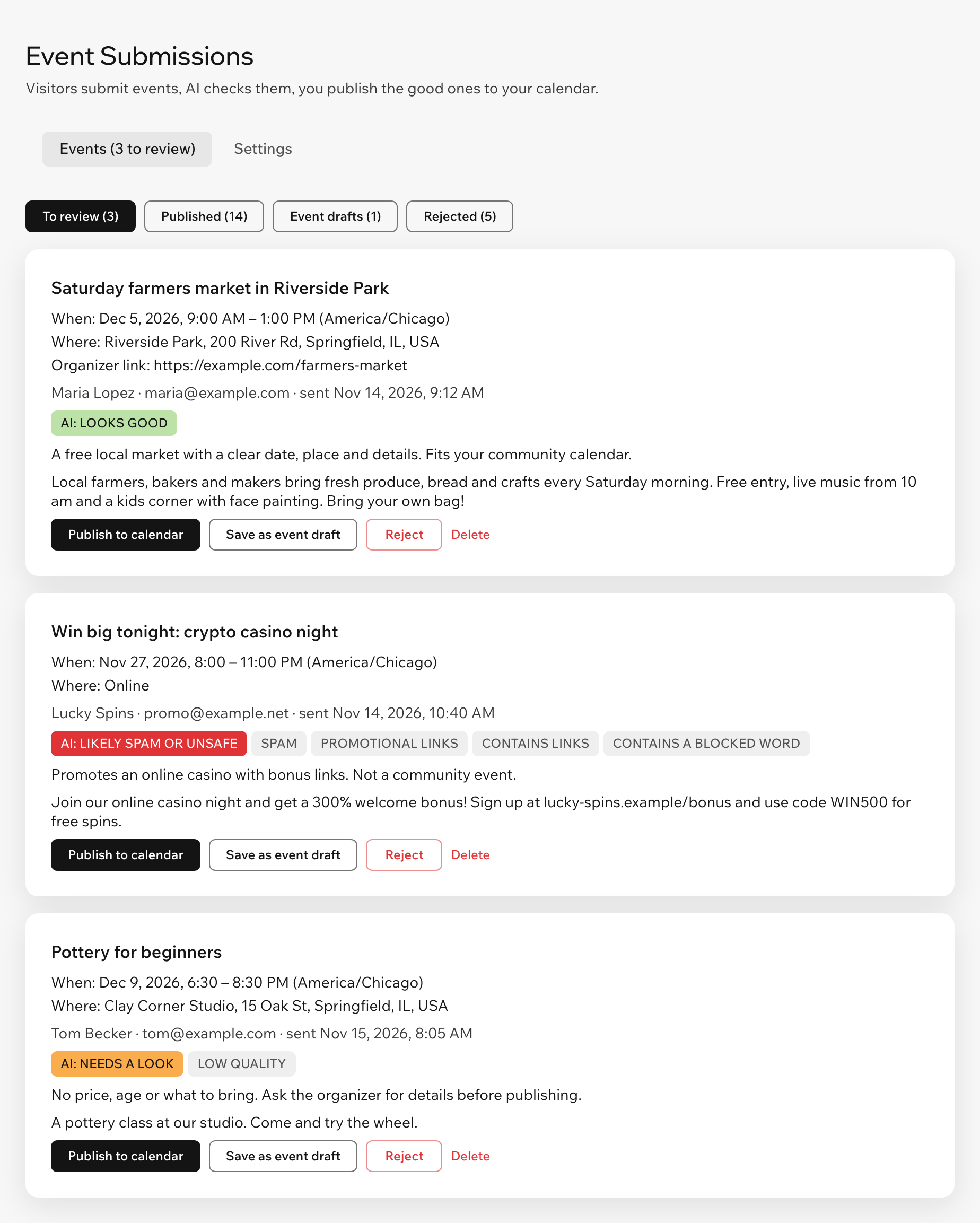
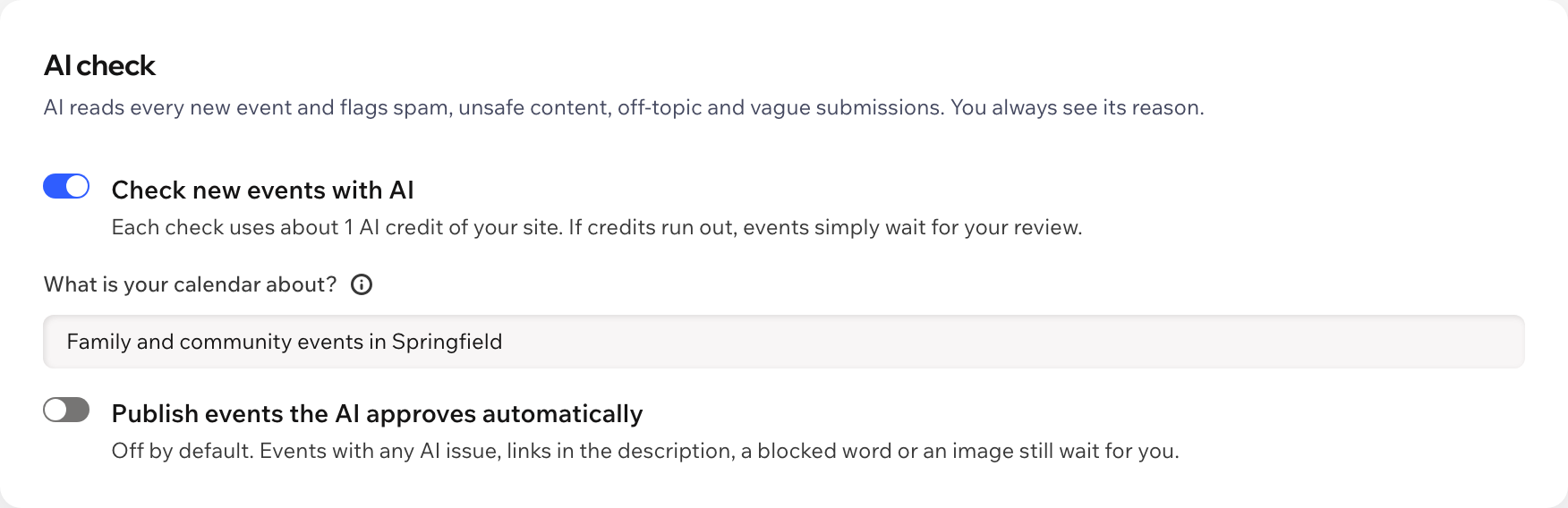
AI checks every event for spam, promotional links, offensive or unsafe content, events off your calendar topic and vague details, and gives a verdict with a short reason.
Publish to your Wix Events calendar with the date, place, description and image filled in, save it as an event draft or reject it.
Turn it on and events the AI approves with no issues, no links, no blocked words and no image go live on their own. Off by default.
No events in the past, more than two years ahead or longer than 30 days, and the end always comes after the start.
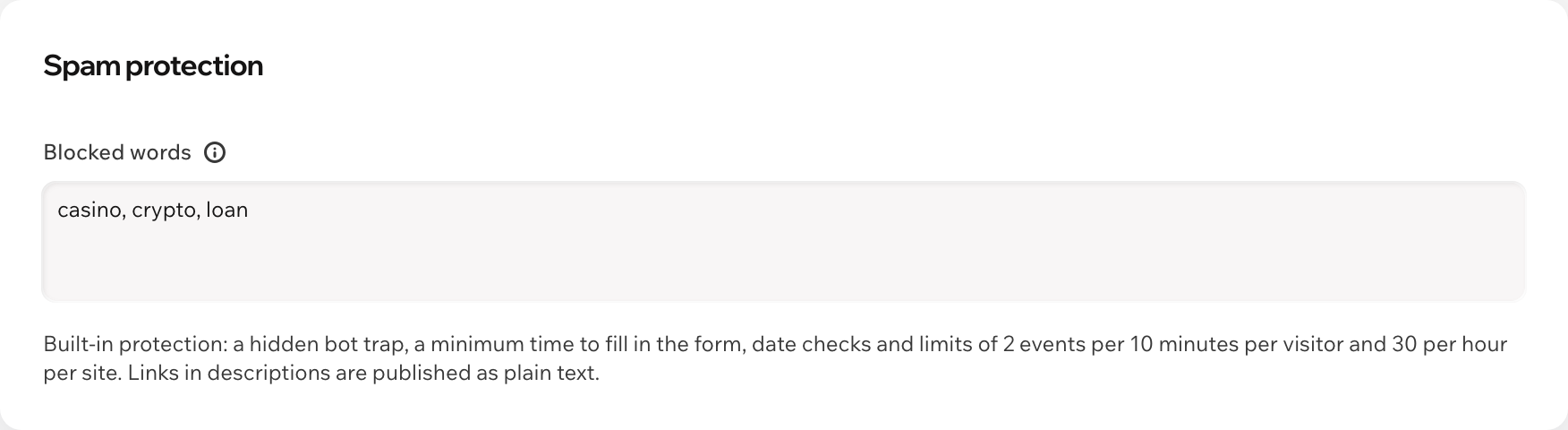
A hidden bot trap, a minimum time to fill in the form, limits per visitor and per site, and your own blocked words. Links in descriptions are published as plain text.
Get an email and a notification in your dashboard and mobile app when an event arrives. Turn each on or off.
The form follows your site language, and the dashboard speaks both. Aria, the AI assistant in your dashboard, can tell you how many events wait, read-only.
What you see
Good events are marked “looks good”, spam and vague events say why, and links or blocked words are flagged on their own. Publish, save as an event draft or reject each one.
Pricing
$5.99/month
or $4.79/month billed yearly · 7-day free trial
Needs Wix Events on your site to publish events. The AI review uses your site's AI credits, about one per event; if they run out, events simply wait for you. Set up the form before the trial starts: in the editor you see a preview, and visitors see the form while your trial or plan is active. Prices shown in USD.
In your editor, add a page such as “Submit an event” and click Add Elements, then App Widgets, then Event Submission Form. Publish your site: visitors can now submit events.
Yes, to publish events. Add Wix Events to your site; until then visitors can still submit events, and they wait in the app.
In Wix Events, like events you create yourself: on your events page, with registration if guests can RSVP. You can edit them later in Events.
In the time zone of the visitor who submitted the event. It is shown on each submission and saved with the event.
Spam, promotional links, offensive or unsafe content, events that do not fit your calendar topic and vague or low-quality submissions. It only advises: you decide, unless you turn on automatic publishing.
The AI check is off, your site ran out of AI credits or the check did not answer in time. Read it yourself before publishing.
A hidden field that only bots fill, a minimum time to fill in the form, date checks, limits of 2 events per 10 minutes per visitor and 30 per hour per site, your blocked words and the AI check. Links in descriptions are published as plain text.
Events already in Wix Events stay there. Submissions waiting in the app may not be kept.