Morning Sencha
Green tea · $14
 Accessibility Widget Get the app
For any Wix site · Supported in Aria
Accessibility Widget: WCAG EAA adds a small button to every page. Visitors open it and make text bigger, add spacing, switch to a readable font or a higher contrast, highlight links, enlarge the cursor and stop animations, for themselves.
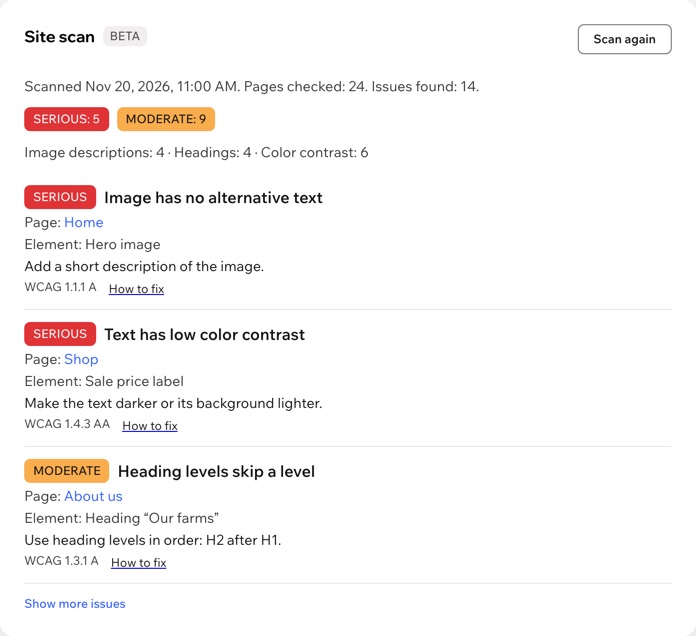
Try the live demoThe widget is free with no view limits. Pro adds a site scan (beta) that shows what to fix on your pages: $4.99/month or $3.99/month billed yearly, with a 7-day free trial.
Live demo
The store below runs the same widget merchants install. Click the round button in its corner and try the tools: they change the store page the way they change your site. Nothing is saved or sent.
The store is an illustration; the button and the panel are the real widget. Changing the options above opens the store again like a new visit: in the demo the visitor's choice is not remembered.
Green, black and herbal teas from family farms, packed by hand in our shop. Read how we choose our farms.

Green tea · $14
Black tea with spices · $16
Herbal, caffeine-free · $12
We started Leaf & Kettle at a kitchen table with three teas and a borrowed scale. Today we work with nine small farms and still taste every batch before it goes into a tin. Questions about a blend? Write to us.
What you get
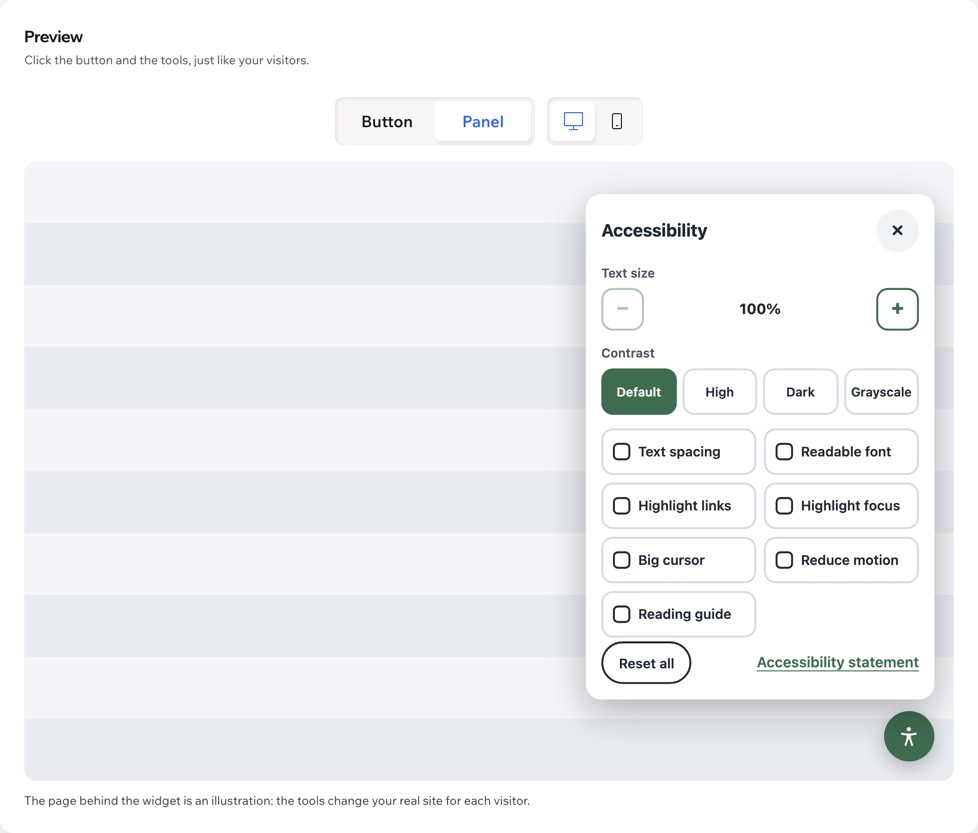
110, 125 or 150%. The text on the page grows, and your site header stays in place.
Wider line, letter and word spacing, the values from WCAG 1.4.12.
A plain sans-serif font for all text; icons stay as they are.
High, dark or grayscale. In dark mode, photos and videos keep their colors.
Underlined, outlined links and a strong ring around the element in keyboard focus.
A big cursor and a line that follows the mouse to help keep the place.
Stops animations and transitions and pauses videos on the page.
One click brings the site back to normal. A number on the button shows how many settings are on.
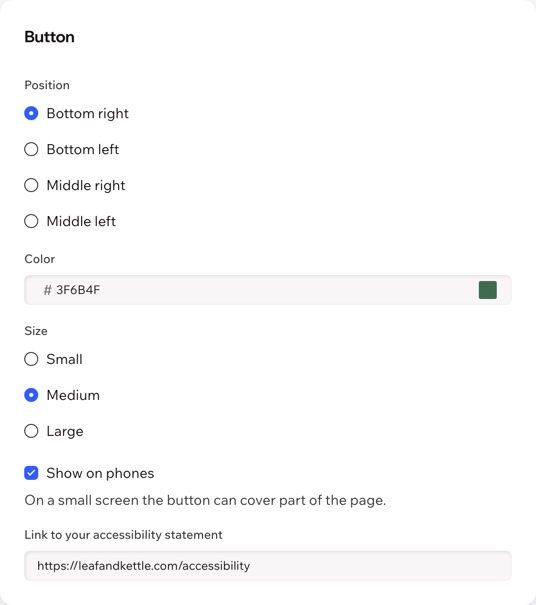
Corner, color and size, on phones or not, which tools to show and a link to your accessibility statement.
The panel works with Tab and arrows, closes with Escape and announces changes. On phones it opens as a full sheet.
Your settings are already in the page: no requests to a server and no view limits.
The widget follows your site language, the dashboard speaks both, and Aria, the Wix AI assistant, can read your widget settings.
What you see
One button turns the widget on. Pick the corner, color and size, choose the tools and try everything in the live preview before your visitors do.

Pricing
$0
The whole widget, on every page
$4.99/month
or $3.99/month billed yearly · 7-day free trial
Tools for visitors are never behind a paywall: the free plan has the whole widget. If Pro ends, the widget keeps working. Prices shown in USD.
No. The widget helps visitors adjust your site for themselves, but it does not fix your pages, and no widget can make a site compliant on its own. That depends on your content: descriptions for images, enough color contrast, headings in order, labels on forms. Pro's site scan (beta) shows what to fix on each page. This is not legal advice: if you are unsure what your site needs, ask a lawyer.
A round button in the corner you choose. It opens a panel with the tools you turned on, a Reset all button and, if you add one, a link to your accessibility statement.
Yes, if they allowed functional cookies in your cookie banner, or your site has no banner. Otherwise the choice applies to the page they are on. It is kept only in the visitor's own browser.
No. It is one small script, and your settings are already in the page, so it makes no requests to a server. There are no view limits.
It scans up to 300 published pages of your site and lists issues with images, headings, contrast and keyboard use, each with the page, the element and a hint on how to fix it. The scan is in beta. The widget itself stays free.
Yes. In the app dashboard choose which tools visitors see and whether the button shows on phones, where it can cover part of a small screen.
The widget follows your site language: English and Spanish are built in, other languages show English. The dashboard speaks both.
Remove it in your site dashboard under Manage Apps. To keep the app but hide the button for a while, use Turn off in the app dashboard.
Only your widget settings, in a data collection on your own site. Visitors' choices stay in their own browsers; the app collects no personal data about visitors.